


Is your LED mirror touch sensor not working? Perhaps the touch symbol remains illuminated, but the mirror lights refuse to turn on. Alternatively, the mirror may respond to a short tap yet fail when you try to adjust the brightness.
These symptoms do not always mean the touch switch itself is defective. Power interruptions, moisture on the glass, incorrect control settings, or problems elsewhere in the electrical system can produce similar results.
Many modern LED bathroom mirrors use one integrated touch switch for lighting control and dimming. A short touch may turn the light on or off, while holding the same button adjusts brightness. There is no separate dimming button on this type of control.
However, the operating sequence can vary between products. Some mirrors also offer color-temperature adjustment, memory functions, defogging, or additional sensors.
For hotels and commercial projects, understanding the difference between a sensor problem and an electrical fault can prevent unnecessary mirror replacement. This guide explains seven possible causes, safe troubleshooting steps, and quality-control considerations for bulk installations.
An unresponsive LED mirror touch sensor may result from an interrupted power supply, moisture or residue on the touch area, incorrect operating gestures, an unusual stored brightness setting, incompatible external controls, a loose internal connection, or a failed electrical component.
Start with safe observations. Confirm the normal wall-switch setting, clean and dry the touch symbol, and follow the manufacturer's instructions for short-touch and long-touch operation.
If the problem continues, record the symptoms and arrange qualified inspection. Do not remove a powered wall-mounted mirror, open its electrical housing, or test internal wiring yourself.
LED Mirror Touch Sensor Problems: What Do the Symptoms Mean?
The way a mirror responds can help identify which part of the system needs attention. A completely inactive mirror is different from one that responds to touch but produces no light.
Before replacing the touch controller, compare the visible symptoms with the following possibilities.
| Observed Symptom | Possible Explanation | Recommended First Check |
|---|---|---|
| Touch icon and mirror lights are both off | Power interruption, control state, or an electrical fault. | Review the normal wall switch and approved power supply. |
| Touch indicator is lit but does not respond | Moisture, residue, incorrect touch operation, or controller trouble. | Dry the glass and follow the operating instructions. |
| Light turns on but cannot be dimmed | Incorrect long-press operation or a control-function problem. | Confirm the single-switch dimming sequence. |
| Touch icon responds but LED lighting stays dark | Possible driver, LED circuit, or internal connection issue. | Record the behavior and request qualified inspection. |
| Mirror occasionally switches on or off | Condensation, external power changes, or an intermittent control fault. | Check the environment and document when it occurs. |
| Several hotel mirrors show the same problem | Shared power control, installation configuration, or component issue. | Compare room records and approved specifications. |
Important: Not every mirror has an illuminated standby indicator. Indicator colors and meanings also vary by model. A dark touch symbol alone is not enough to diagnose a defective sensor.
How Does a Single LED Mirror Touch Switch Control On/Off and Dimming?
A common touch-control arrangement combines the power and dimming functions in one switch on the mirror surface. The user does not need a separate brightness-control button.
In many single-switch LED mirror designs, a brief touch changes the lighting state. When the light is on, holding the same touch area gradually changes the brightness.
Turn the LED Lighting On or Off
A brief tap commonly turns the lighting on or off. The exact timing depends on the controller's programmed operation.
Adjust Brightness with the Same Switch
Holding the touch area commonly starts a gradual dimming adjustment. Release your finger when the desired brightness is reached.
Some controllers reverse the dimming direction after the next long press. Others may also use a defined tapping sequence to change color temperature. These features depend on the approved model.
The Bath/Co LED Mirror User Instructions provide an example of integrated short-touch switching and long-touch dimming.
For an NISSIYA project, the supplied operating instructions and approved control sample determine the actual function. The single-switch arrangement illustrated here should not be assumed to describe every LED mirror configuration.
7 Causes of an LED Mirror Touch Sensor Not Working
A touch-control problem may originate in the power supply, user interaction, controller, or associated lighting circuit. The causes below separate simple operating issues from faults that require technical service.
The Mirror Is Not Receiving Its Intended Power
An LED mirror needs a suitable electrical supply before its touch controls can operate. If power is interrupted, touching the glass cannot activate the lighting.
In a home, a wall switch, protected outlet, or circuit breaker may affect the supply. Hotel bathrooms can involve additional arrangements, including room-control systems or building-managed circuits.
For example, some hotel electrical designs disconnect selected loads when the guest leaves the room. A mirror may therefore appear unresponsive even though its internal touch controller is not damaged.
However, the specific supply arrangement depends on the approved electrical design. No universal hotel wiring method applies to every installation.
Recommended check: Confirm the normal power-control settings described in the product manual. If a breaker repeatedly trips or there are signs of electrical damage, stop using the mirror and request qualified assistance.
Moisture or Residue Is Affecting the Touch Area
Bathroom mirrors operate in environments where condensation, splashes, and cleaning residue are common. Moisture covering the touch symbol can interfere with the operation of some capacitive touch controls.
Soap residue, fingerprints, and cleaning-product films may also affect the surface condition. Consequently, a switch can appear inconsistent even when the underlying controller is functional.
A sensor that works normally when the glass is dry but becomes unreliable after a hot shower deserves closer investigation. The observation may indicate a moisture-related issue, although it does not prove that the sensor itself is defective.
Recommended check: Clean the touch area according to the mirror manufacturer's instructions. Use a soft, lightly dampened cloth when appropriate, then dry the glass completely before testing the normal touch operation.
Avoid spraying cleaning liquid directly onto electrical controls or allowing moisture to collect around the mirror edges.
The Single Touch Switch Is Being Operated Incorrectly
A common misunderstanding involves the difference between a short touch and a long touch. Users may repeatedly tap the control when they actually want to adjust brightness.
On a single-switch dimmable LED mirror, these functions can share the same sensing area. A quick tap may control lighting power, while a longer touch changes brightness.
Pressing too rapidly or using an unfamiliar gesture can lead to unexpected behavior. Some electronic controls also need a brief interval between commands.
Hotel guests may not understand the control logic immediately, particularly when the mirror has no separate operating instructions nearby.
Recommended check: Follow the approved model instructions. Test the normal short-touch function first, then the specified long-touch dimming operation.
Do not assume an additional touch symbol is required for brightness adjustment on the single-switch configuration.
Stored Brightness or Controller State Is Creating Confusion
Some LED mirror controllers include memory functions that retain a previous brightness level or lighting state. Depending on the design, the mirror may resume the last selected setting when power is restored.
A very low brightness setting can sometimes make the light appear inactive under bright room lighting. Other controllers may respond differently after a power interruption.
These behaviors depend on the selected control module. Memory operation, automatic restoration, and available reset functions are not identical across all mirrors.
Recommended check: Review whether the approved model includes a memory function. If the manufacturer specifies a safe user reset, follow that procedure exactly.
Avoid repeatedly cycling power or pressing undocumented button combinations in an attempt to reset an unfamiliar controller.
External Wall Controls or Dimmers Are Incompatible
An integrated touch-controlled mirror may already manage the LED brightness electronically. Connecting it to an incompatible external dimmer can create unexpected operating conditions.
Possible symptoms include unstable brightness, inconsistent switching, or loss of control. However, such symptoms can also originate from unrelated electrical faults.
Commercial projects require particular attention because the mirror may be connected to hotel room controls, wall switches, timers, or building management equipment.
A conventional on/off supply switch and an electronic phase-cut dimmer do not necessarily behave the same way. Compatibility must be confirmed against the actual LED driver and touch-controller specifications.
Recommended check: Ask the project electrician to compare the installed control arrangement with the manufacturer's approved electrical drawing.
NISSIYA's LED Bathroom Mirror Electrical Requirements Guide explains important considerations for supply voltage, drivers, and control methods.
The Touch Module or Internal Connection Has a Problem
Depending on the design, a touch sensor operates through an electronic module positioned behind the mirror glass. Its installation and electrical connections must follow the intended component arrangement.
A displaced sensing module, damaged contact arrangement, or loose internal connection can interfere with touch recognition.
Transportation damage, installation stress, or unsuitable component positioning may contribute to these problems. Nevertheless, the visible symptom alone cannot establish which internal part is responsible.
The mirror may also contain a rear frame, mounting hardware, LED strips, and electrical connections. Investigating these components can require partial removal of the assembly.
Recommended check: Document the failure and contact the supplier or authorized service technician. Do not remove the mounted glass or attempt to reposition internal sensor parts yourself.
The Touch Controller, LED Driver, or Lighting Circuit Has Failed
Not every lighting failure originates in the touch sensor. A working touch module may send a command while another component prevents the LEDs from turning on.
The LED driver supplies the appropriate electrical output for the lighting system. An internal controller, connector, or LED circuit can also affect the final response.
For example, an illuminated touch indicator with no visible LED lighting may point toward a different fault from a completely inactive sensor. These observations help narrow the investigation but do not identify the failed component with certainty.
Component damage, moisture intrusion, and electrical stress may require professional assessment. Replacement parts must also match the approved mirror design.
Recommended check: Arrange diagnosis by qualified personnel using the manufacturer's electrical information. Do not substitute a different LED driver or touch module based only on a similar appearance.
These seven causes show why an LED mirror touch sensor complaint should begin with careful observation. Replacing the touch switch before checking the approved power and control arrangement can lead to unnecessary expense.
How to Check an LED Mirror Touch Sensor Safely
Homeowners and hotel staff can perform several non-invasive checks before requesting electrical service. These steps focus on visible controls and documented operating behavior.
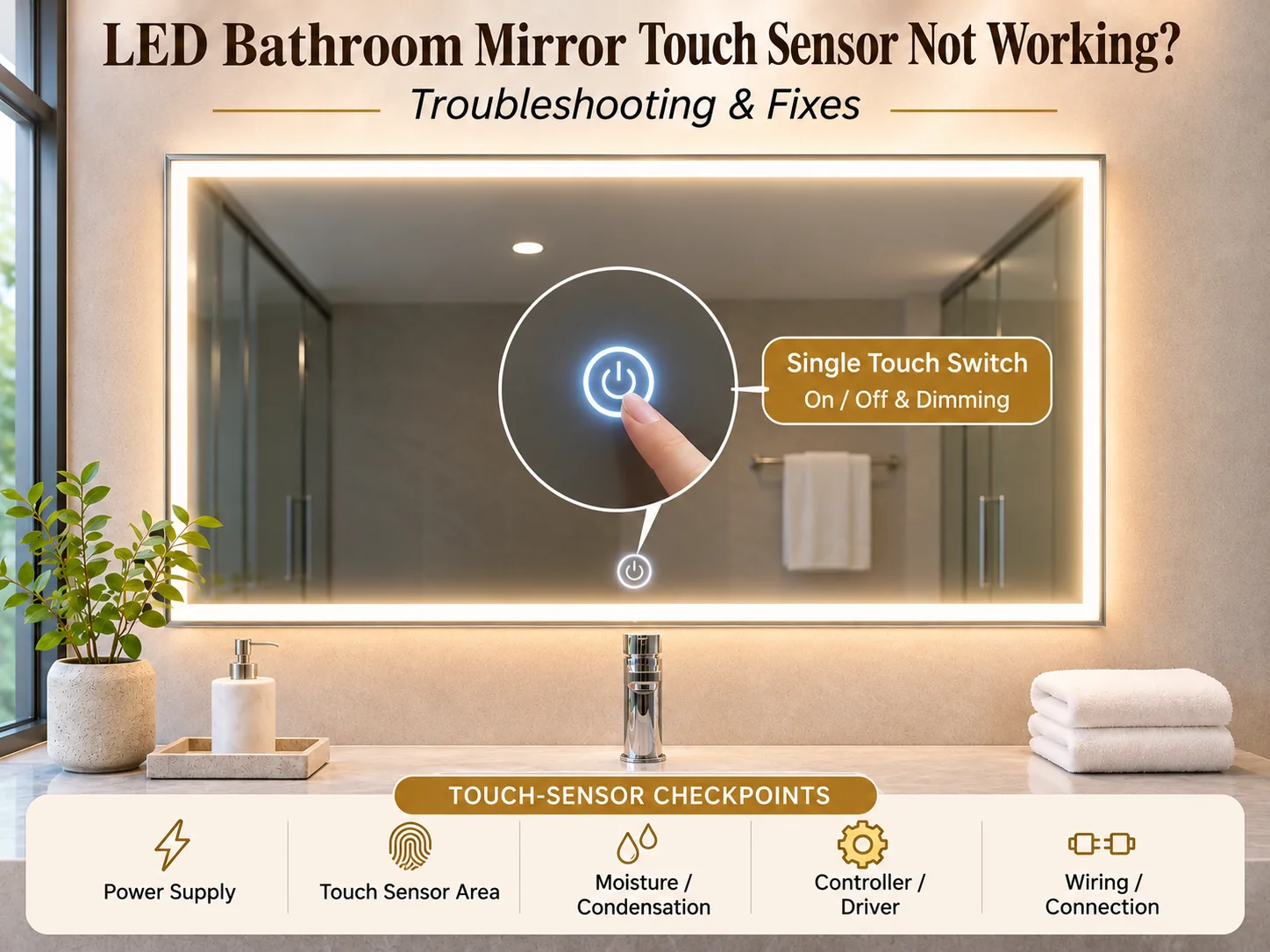
The following illustration shows a single integrated touch switch controlling lighting power and dimming. The checkpoints beneath the mirror represent possible areas of investigation, not instructions to open electrical components.
Record What the Mirror Is Doing
Determine whether the mirror is completely inactive, responds without lighting, or operates inconsistently. Note the behavior of any indicator light, but interpret it using the model's instructions.
Confirm the Normal Power Controls
Check the wall switch or room-control setting normally used for the mirror. Do not open electrical panels or reset a repeatedly tripping breaker as a troubleshooting experiment.
Clean and Dry the Touch Area
Inspect the touch symbol for water droplets, visible residue, or a damp film. Clean it using the approved method and dry the glass completely before retesting.
Use the Correct Short-Touch Operation
Follow the supplied instructions for turning the lighting on and off. On the single-switch configuration discussed here, a short touch commonly controls the lighting state.
Test Long-Touch Dimming Where Supported
With the light operating, hold the same touch area according to the manual. Observe whether brightness changes, then release your finger at the desired level.
Follow an Approved Reset or Report the Fault
If the manufacturer documents a reset using an accessible external isolation switch, follow that procedure. Otherwise, stop testing and provide the recorded symptoms to a qualified technician.
Electrical safety notice: Never remove a powered bathroom mirror, disconnect internal terminals, bypass a touch controller, or test live wiring without the required qualifications. Stop using the product if there is a burning smell, visible damage, unusual overheating, or repeated protective-device tripping.
If the mirror lights flicker rather than failing to respond to touch, NISSIYA's LED Bathroom Mirror Flickering Guide
Touch Sensor Failure vs LED Driver Failure: What Is the Difference?
A mirror's touch controller and LED driver perform different functions. The touch control recognizes the user's command, while the power and lighting components make the LEDs operate.
The two systems can interact, but they should not be treated as interchangeable. A mirror that receives a touch command yet produces no light may require investigation beyond the sensor.
Touch Sensor or Controller
Recognizes user input and manages supported commands such as on/off switching or brightness adjustment. The exact functions depend on the controller design.
LED Driver and Light Circuit
Provides and distributes the electrical power required by the approved LED system. A problem here may prevent lighting even when touch commands are detected.
Some products use a combined control and power arrangement, while others use separate modules. Therefore, the actual component layout must be confirmed from the supplied electrical drawing.
An LED mirror touch sensor that appears defective should not be diagnosed solely from the mirror's lighting state. Qualified inspection can determine whether the control, driver, wiring, or LEDs require attention.
How Hotels Should Handle LED Mirror Touch Sensor Problems
In a hotel, the same visible fault may have different implications depending on how many rooms are affected. One unresponsive mirror can involve a local issue, while repeated complaints may reveal a shared configuration problem.
Maintenance teams should record the symptoms before replacing multiple mirrors. Consistent information allows the supplier and electrical contractor to compare failures more accurately.
| Failure Pattern | What to Investigate | Suggested Hotel Action |
|---|---|---|
| One guestroom only | Local controls, individual product, or electrical connection. | Document the model and arrange targeted inspection. |
| Several rooms on one floor | Shared electrical circuits or room-control configuration. | Ask the electrician to review common factors. |
| Several mirrors from one production batch | Control module specification and production records. | Coordinate a supplier investigation using batch information. |
| Problems only after a wall-control change | Compatibility with switches, dimmers, or automation. | Compare the installation with the approved electrical design. |
| Mirror responds but dimming behaves differently | Control programming, settings, or model mismatch. | Check the approved sample and user instructions. |
| Problems become noticeable after showers | Moisture around the touch area or other environmental factors. | Record the conditions and request technical assessment if persistent. |
For a property with many guestrooms, recording the room number, product model, installation date, and observed control response can make troubleshooting more efficient.
It is also useful to distinguish a failed touch command from a normal power interruption caused by the room's operating sequence.
Hotel maintenance recommendation: Do not replace every mirror simply because several rooms report an unresponsive touch button. First determine whether the problem is limited to individual products or connected to a shared installation condition.
How Manufacturers Can Reduce LED Mirror Touch Control Problems
For commercial buyers, prevention should begin before the mirrors reach the installation site. A representative sample and an agreed control specification help establish how the finished product is expected to operate.
NISSIYA supplies bathroom mirrors for hotel, project, wholesale, and OEM/ODM applications. Depending on the approved design, selected mirrors may include touch switching, dimming, color-temperature adjustment, and anti-fog functions.
The factory and buyer should confirm the exact control arrangement rather than assuming that every model uses identical electronics or operating gestures.
Confirm the Single-Switch Control Logic
For a design using one touch switch for lighting and dimming, the approved sample should demonstrate the intended short-touch and long-touch behavior.
If color-temperature adjustment or memory functions are included, those operations also need to be defined. Clear instructions help hotel guests and maintenance teams understand the delivered product.
Review Electrical Compatibility
The driver output, LED system, touch controller, and external supply arrangement must work together. Product specifications should identify the destination market, voltage, and intended control method.
Any requested change to the electrical configuration should be reviewed before bulk production. A different wall dimmer or hotel room control can affect system compatibility.
Check Touch Response During Factory Testing
For applicable NISSIYA LED mirror orders, a 48-hour powered aging process provides additional time to observe lighting and control behavior.
Functional inspection should include the switch response and supported brightness adjustment. When relevant, testing may also cover color temperature, additional sensors, and anti-fog operation.
An aging test can help reveal certain early faults, but its duration alone does not guarantee that every possible controller failure will be detected.
See NISSIYA's LED Mirror Aging Test and Quality Control Guide for an explanation of the factory's testing process.
Keep Approved Drawings and Batch Records
Hotels may need service assistance long after the original installation. Product identification, approved wiring diagrams, control specifications, and relevant manufacturing records can help determine suitable replacement parts.
Maintaining these records also reduces the risk of installing a controller with incompatible voltage, load rating, or operating behavior.
LED Mirror Touch Sensor Specifications Buyers Should Confirm
Before approving a bulk LED bathroom mirror order, project buyers should document the touch-control functions and electrical requirements.
The following checklist helps distinguish essential specifications from optional functions that depend on the selected product.
| Specification | What Buyers Should Confirm |
|---|---|
| Control Type | Single integrated touch switch or another approved configuration. |
| On/Off Operation | Expected short-touch behavior and normal standby state. |
| Dimming Operation | Whether long-touch brightness adjustment is included and how it operates. |
| Color Temperature | Fixed CCT or adjustable lighting, including the approved control sequence. |
| Memory Function | Whether settings are retained after switching off or restoring power. |
| Electrical Input | Approved AC supply, frequency, and destination market. |
| LED Driver | Compatible output, power rating, and approved LED system. |
| External Controls | Compatibility with wall switches, dimmers, or hotel automation. |
| Bathroom Protection | Model-specific IP rating and applicable installation requirements. |
| Factory Function Test | Touch response, switching, dimming, and other approved features. |
| Service Information | Model identification, approved repair method, and replacement-component details. |
For broader purchasing requirements, refer to the NISSIYA Hotel Bathroom Mirror Specifications Guide.
Project recommendation: Approve the actual touch-control behavior on a physical sample before releasing bulk production. The single-switch operation, external electrical controls, and supported functions should all match the project specification.
LED Mirror Touch Sensor: Frequently Asked Questions
Why is my LED mirror touch sensor not working?
Possible causes include missing power, moisture or residue on the touch area, an incorrect operating gesture, controller settings, incompatible external controls, or internal component failure. Begin with the approved user checks before requesting electrical diagnosis.
How do I dim an LED mirror with one touch switch?
On many single-switch LED mirrors, a short touch turns the lighting on or off, while holding the same touch area adjusts brightness. The exact sequence depends on the controller and should be confirmed in the product manual.
Can moisture make an LED mirror touch button unresponsive?
Yes. Moisture, condensation, and residue can interfere with some touch controls. Clean and dry the glass using the approved method, then check whether normal operation returns. Persistent problems require further assessment.
Why does the touch symbol light up but the LEDs stay off?
A lit indicator may show that part of the control system has power, but it does not prove the LED driver or lighting circuit is operating correctly. The exact meaning of the indicator depends on the mirror design.
Can a wall switch affect an LED mirror touch sensor?
Yes. A wall switch, room-control system, or incompatible dimmer may affect the supply or operating behavior. The electrical arrangement must match the approved mirror specification.
Why does my LED bathroom mirror turn on or off by itself?
Possible causes include moisture around the touch area, external power-control behavior, or an intermittent electronic fault. Record when the problem occurs and request professional inspection if it continues.
Can I reset an LED bathroom mirror touch switch?
Some models provide a reset procedure using an accessible external power control. Follow the manufacturer's instructions for the exact product. Do not open electrical components or repeatedly reset a circuit that is tripping.
Should a hotel replace the entire mirror when the touch control fails?
Not necessarily. The cause may involve the supply, controller, driver, or another serviceable component. A qualified technician and the supplier should confirm the fault and approved repair method before deciding on full replacement.
Identify the Touch-Control Problem Before Replacing the Mirror
An LED mirror touch sensor that stops responding does not always require replacement. Power interruptions, surface moisture, unfamiliar touch gestures, stored settings, and incompatible external controls may produce symptoms similar to an internal failure.
For single-switch LED mirrors, remember that lighting on/off and dimming can be integrated into the same touch area. The approved operating sequence should guide the initial checks.
When the fault involves internal electrical components, qualified diagnosis is essential. Touch controllers, LED drivers, and wiring must be evaluated against the actual product specification.
For hotel and commercial projects, reliable operation begins with sample approval, compatible electrical design, documented control functions, and appropriate factory inspection. These measures can help buyers reduce installation confusion and manage maintenance more effectively.
Ready to Start Your Next Hospitality Project?
From initial design concepts to final product delivery, NISSIYA provides full-scale manufacturing support for hotels, resorts, and commercial developments worldwide. Let our engineering team help you translate your vision into reality with precision-engineered, commercially compliant mirror solutions.